
Google Drive Cleaner
Free up Google Drive storage without hunting file by file.
Mult Cleaner's Google Drive Cleaner scans your Drive, surfaces the biggest and oldest files, and lets you bulk delete unused stuff using safe filters for size, date, type and folders so you can reclaim storage in minutes.
Connect once via Google, review a clear list of heavy and old files, and delete in bulk. No more guessing what's filling your storage.
Google Drive Cleaner
by Mult Cleaner
4K-trip-footage-final-v3.mp4
Video · Last opened 2019
old-backup-photos-2018.zip
Archive · Last opened 2018
Client-project-assets-current.psd
Design · Last opened this week
Sort by
Size
Filter by
Last opened
Filter by
Type
Why use a Google Drive cleaner instead of doing it manually?
Google Drive helps you see file sizes, but it doesn’t make it easy to review years of folders, duplicates, exports and abandoned projects. Mult Cleaner lets you sort Drive by size, age and activity so you can remove truly unused files without touching active work.
Storage limits
Avoid unnecessary upgrades
Free up tens of GB from forgotten folders, unused backups and large media files so you can delay or skip increasing your Google One plan.
Clarity
Know what’s inside your Drive
Identify which folders, file types and old exports occupy your storage — instead of guessing where your space went.
Speed
Clean in one focused session
Instead of digging into every folder, generate a single ranked list of large, unused files and clean them all in a batch.
How to Clean Google Drive Fast Without Manually Selecting Files.
Connect Google Drive, scan for heavy or unused files, filter by size, age, type or folder, and bulk-clean safely with a clear preview.
-
1
Connect your Google Drive
Use Google’s secure OAuth login to connect Drive. No passwords shared, and you can revoke access anytime from your Google security settings.
-
2
Scan & filter your files
Mult Cleaner analyzes file metadata i.e size, type, folder, owner and last opened date. Apply filters like “larger than 250 MB”, “not opened in 2 years” or “videos only”.
-
3
Preview & bulk delete safely
Review all flagged files in a sortable list, deselect anything important, view total space recovered, and delete unused items in a single bulk cleanup.
Google Drive Cleaner features to free up storage fast
Mult Cleaner’s Google Drive Cleaner is built for real storage problems: giant video files, old backups, exports you forgot about and folders you never open – so you can clean up Google Drive without touching active work.
Sort Google Drive by size & folder
Quickly see which files and folders eat the most space instead of manually drilling into every directory inside Google Drive.
- • Rank files by size across all of Google Drive
- • Instantly see which folders are heaviest
- • Focus on “My Drive” or specific shared drives only
Filter by last opened & created date
Target files you haven’t touched for years so you can safely remove them while keeping everything that’s still part of your active projects.
- • Use “not opened since 2021” style filters
- • Exclude files created in the last X months
- • Combine age and size for maximum storage impact
Clean by file type (videos, archives & more)
Focus your Google Drive cleanup on heavy categories like videos, archives or raw design files, without touching Docs, Sheets or Slides.
- • Target videos, images, archives, PDFs and more
- • Exclude Google Docs, Sheets and Slides from deletion
- • Create presets like “Old video exports” or “ZIP backups”
Preview, storage totals & cleanup logs
Always know what you’re deleting and how much Google Drive storage you’ll free before you confirm a cleanup.
- • Total space to be freed, in GB/MB
- • File counts by type, folder and filter
- • Logs after cleanup for transparency and auditing
Who benefits most from Google Drive Cleaner?
Mult Cleaner’s Google Drive Cleaner is built for people and teams who rely on Drive every day: creators with huge media libraries, agencies juggling client folders, and individuals who keep seeing the “storage almost full” warning.
Creators & editors
Heavy video, photo & design projects
Clean up old exports, duplicated renders and source files from finished projects, while keeping current work-in-progress folders intact.
Agencies & small teams
Shared drives full of old client work
Find and remove outdated handovers, ZIP archives and backup folders across shared drives without accidentally touching live client projects.
Everyday users
Years of backups & downloads
Surface old phone backups, exported photo archives and installer files so you can free up tens of GB and delay upgrading your Google One plan.
Drive overview (example)
Largest folders by storage usage
Mult Cleaner surfaces views like this so you can decide what to trim first creators, teams or everyday users can all see where their biggest wins are.
Manual Google Drive cleanup vs Drive Cleaner
What changes when you stop clicking through folders and let a proper Drive cleaner surface the real problems.
| Task | Manual in Google Drive | With Google Drive Cleaner |
|---|---|---|
| Find the biggest files | See a ranked list of largest files across your whole Drive. | Delete old & unused content |
| Guess based on folder names and rough dates. | Filter by last opened / created date and size together. | Target specific file types |
| Search by extension, repeat for each type. | Focus on videos, archives, images or PDFs in a single view. | Run regular cleanups |
| Run regular cleanups | Redo the same checks each time your storage fills up. | Saved presets like “Old large videos” and re-run anytime. |
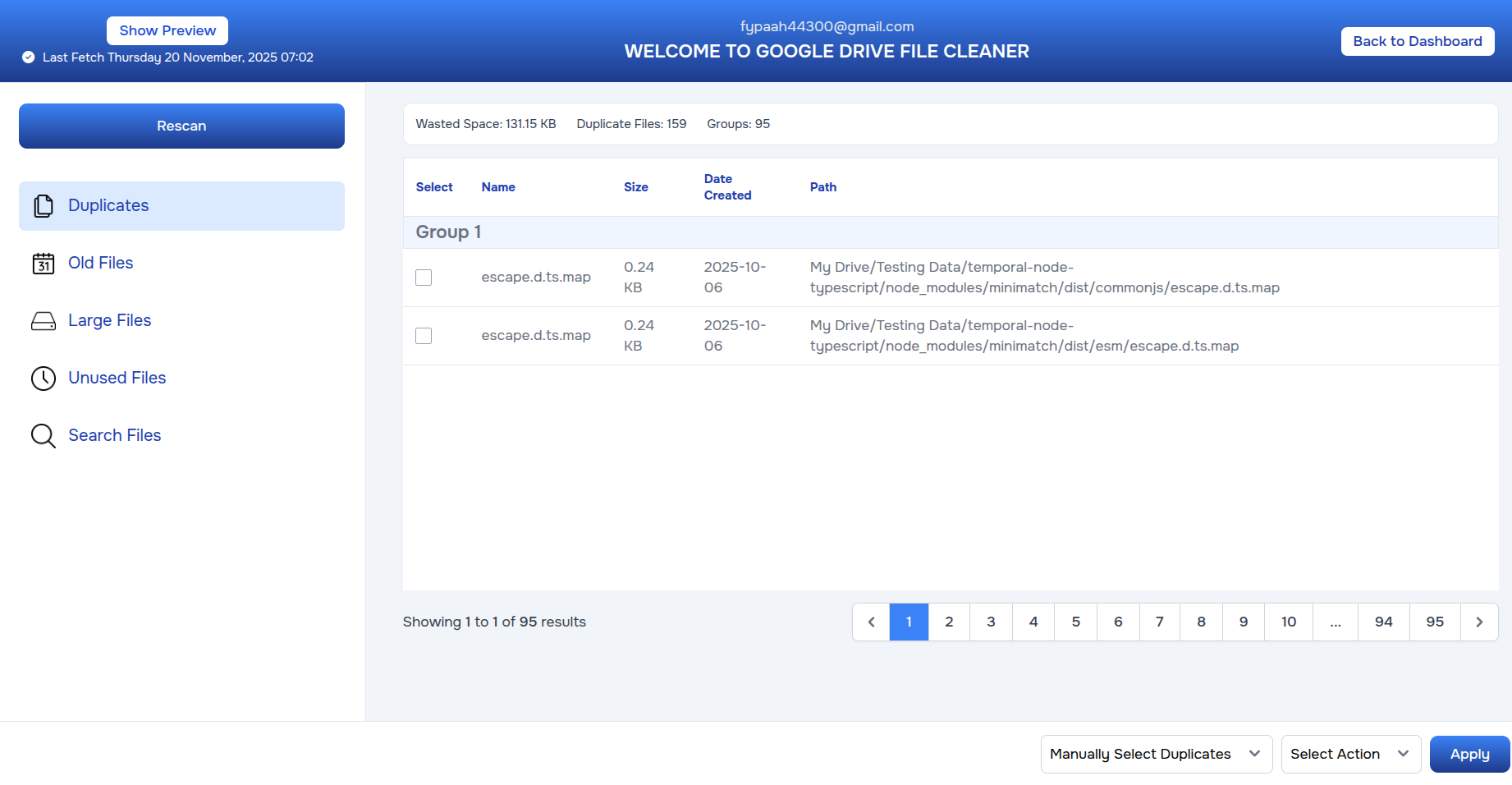
See Google Drive Cleaner in action
Instantly see which files and folders eat the most space, filter by last opened date and type, and confirm how many gigabytes you’ll free before deleting anything.
- • Get a ranked list of the largest files across your entire Drive.
- • Filter by last opened, created date, file type and specific folders.
- • See a live “space to be freed” total in GB/MB for each cleanup.
- • Run bulk deletions on old backups and exports while keeping live docs intact.
Google Drive Cleaner FAQ
Common questions about cleaning Google Drive with Mult Cleaner.
Is it safe to connect my Google Drive? +
Yes. Mult Cleaner uses Google's official OAuth flow and only requests the permissions needed to read file metadata and delete files you select. You can revoke access at any time from your Google account security page.
Can Drive Cleaner accidentally delete important files? +
We focus on visibility and control. You always see a preview with file names, sizes, locations and last opened dates. You choose what stays or goes before any deletion happens. We also recommend running smaller, focused cleanups first.
Does Mult Cleaner support shared drives? +
As long as your Google account has permission to delete files in a shared drive, Mult Cleaner can include those files in scans and cleanups. You can limit filters to “My Drive” or specific shared drives if needed.
How many Google Drive accounts can I connect? +
That depends on your Mult Cleaner plan. Free plans usually support one Drive account with limited deletions, while paid plans unlock multiple accounts and unlimited cleanups. Check the pricing page for details.
Ready to free up Google Drive space?
Connect Google Drive to Mult Cleaner, see your heaviest and oldest files in one place, and clean up gigabytes of space in a single focused session.